

Banglar Yuba Sathi Apply Online 2026 - Complete Guide
বাংলার যুব সাথী অনলাইনে আবেদনের সম্পূর্ণ নির্দেশিকা
অনলাইন আবেদন এখন চালু! ১৫ ফেব্রুয়ারি ২০২৬ থেকে রাজ্যের সব ২৯৪টি বিধানসভা কেন্দ্রে এই প্রকল্প চালু হয়েছে।
Important Information (গুরুত্বপূর্ণ তথ্য)
You can apply in two ways - either online through the portal or offline at camps in your area.
অনলাইন অথবা অফলাইন - দুভাবেই আবেদন করতে পারবেন।
1 Visit the Portal & Start Application
Go to https://apas.wb.gov.in/ and click on the "Click to apply" icon.
পোর্টালে গিয়ে "Click to apply" বাটনে ক্লিক করুন।
2 Keep Your Documents Ready (ডকুমেন্ট প্রস্তুত রাখুন)
Before you start filling the form, make sure all these documents are scanned and saved on your computer or phone. This will save your time!
আবেদন শুরু করার আগে নিচের কাগজপত্র স্ক্যান করে রেডি রাখুন:
মাধ্যমিক অ্যাডমিট কার্ড (PDF, max 2 MB)
মার্কশীট/সার্টিফিকেট (PDF, max 2 MB)
আধার কার্ড (PDF, max 2 MB)
ভোটার কার্ড (PDF, max 2 MB)
ব্যাংক পাসবুক প্রথম পাতা (PDF, max 2 MB)
জাতি সার্টিফিকেট (যদি প্রযোজ্য হয়, PDF, max 2 MB)
পাসপোর্ট সাইজ ফটো (JPG/PNG, max 1 MB)
আপনার স্বাক্ষর (JPG/PNG, max 1 MB)
A valid and active mobile number is very important! আপনার সক্রিয় মোবাইল নম্বর অবশ্যই প্রয়োজন!
3 Mobile Verification (মোবাইল ভেরিফিকেশন)
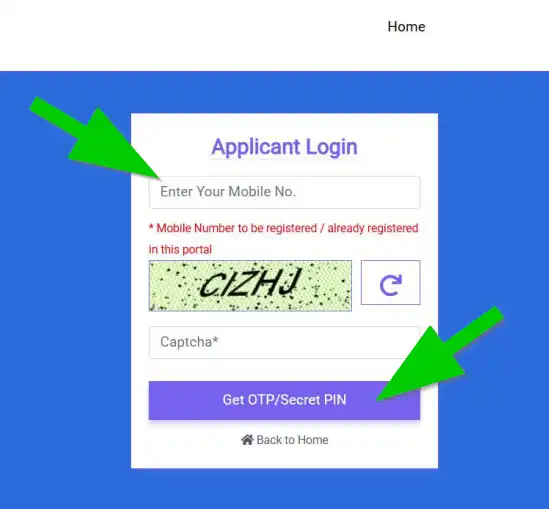
Enter your active mobile number and the captcha code shown on screen.
আপনার মোবাইল নম্বর এবং ক্যাপচা কোড লিখুন।
What Happens Next: After you submit, you'll receive a Secret PIN (OTP) on your mobile via SMS. Use this OTP to login and proceed.
মোবাইলে একটা OTP আসবে - সেটা দিয়ে লগইন করতে হবে।
4 Fill the Application Form (ফর্ম পূরণ করুন)
Once you login successfully, the main application form will open. Fill in all the required details carefully.
লগইন করার পর এপ্লিকেশন ফর্ম খুলবে। সব তথ্য সাবধানে ভরুন।
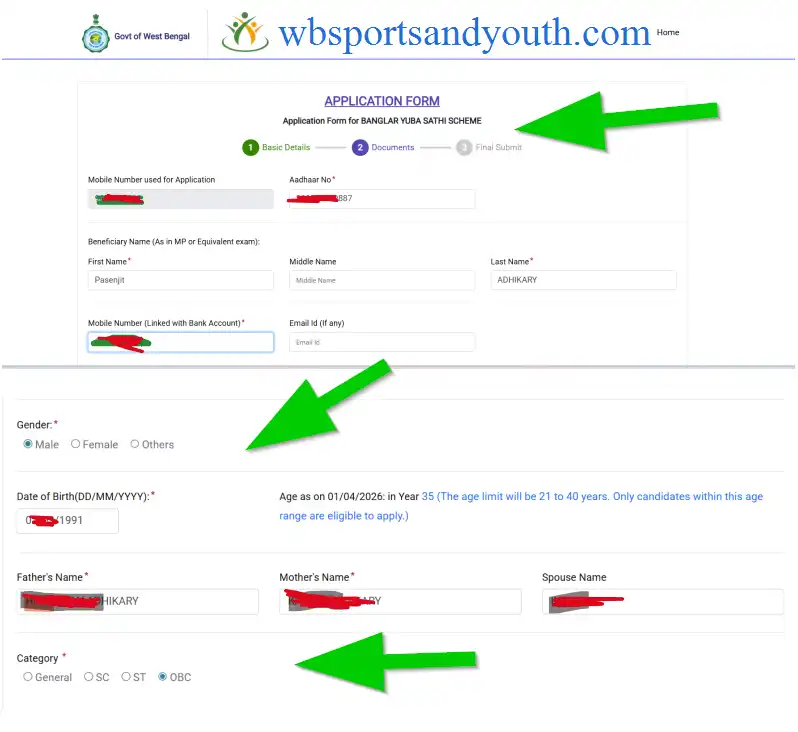
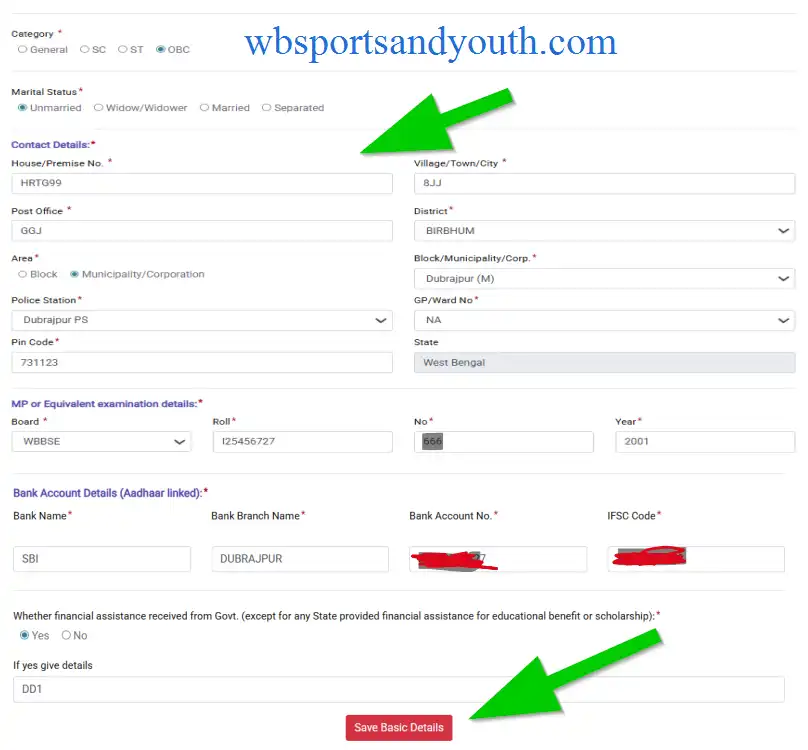
Fill these sections one by one:
A) Personal Details:
- Your full name
- Father's/Mother's name
- Date of Birth
- Gender
- Category (General/SC/ST/OBC)
- Marital Status (Unmarried/Married/Widow/Widower/Separated)
B) Contact Details:
- House/Premise Number
- Village/Town/City name
- Post Office
- District & Block/Municipality/Corporation
- Police Station & GP/Ward Number
- PIN Code & State (West Bengal)
C) Bank Account Details (Aadhaar Linked - Important!):
- Bank Name (e.g., SBI, PNB, etc.)
- Branch Name
- Account Number
- IFSC Code
মনে রাখবেন: Your bank account MUST be linked with your Aadhaar card! ব্যাংক অ্যাকাউন্ট আধার কার্ডের সাথে লিঙ্ক থাকতে হবে!
D) Educational Details (Madhyamik or Equivalent):
- Board Name (e.g., WBBSE)
- Roll Number
- Year of Examination
E) Financial Assistance Question:
You'll be asked: "Have you received any financial assistance from Government (except educational scholarships)?"
- Select Yes or No
- If Yes, provide details
After filling everything, click "Save Basic Details" to save your progress.
সব ভরার পর "Save Basic Details" বাটনে ক্লিক করুন।
5 Upload Documents (ডকুমেন্ট আপলোড করুন)
Now upload all the mandatory documents that you prepared earlier. Make sure the file size and format are correct as mentioned in Step 2.
এখন আগে থেকে রেডি করা সব ডকুমেন্ট আপলোড করুন। ফাইল সাইজ এবং ফরম্যাট ঠিক আছে কিনা দেখে নিন।
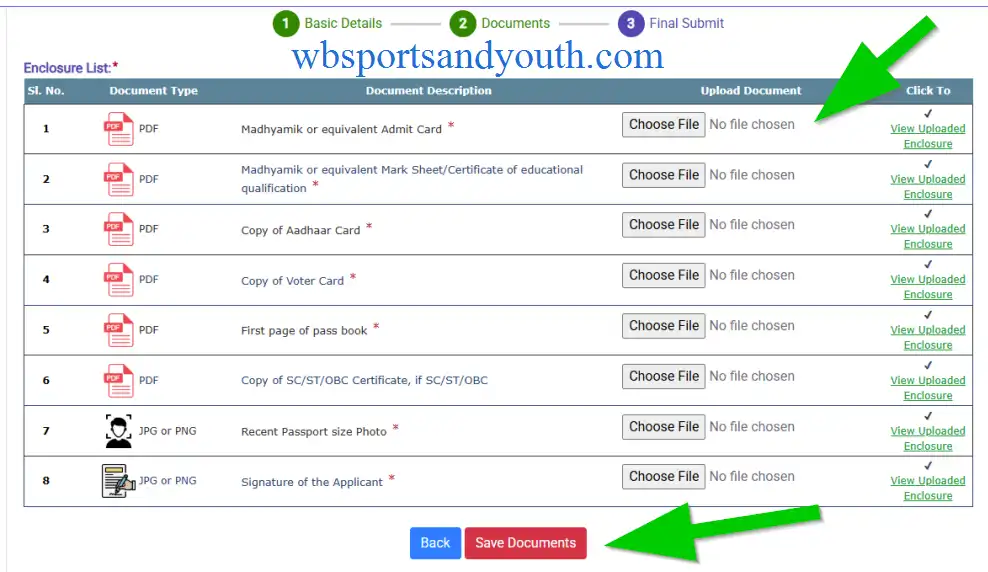
Important: All uploads are compulsory - don't skip any! সব ডকুমেন্ট আপলোড করা বাধ্যতামূলক।
6 Final Submission (চূড়ান্ত জমা)
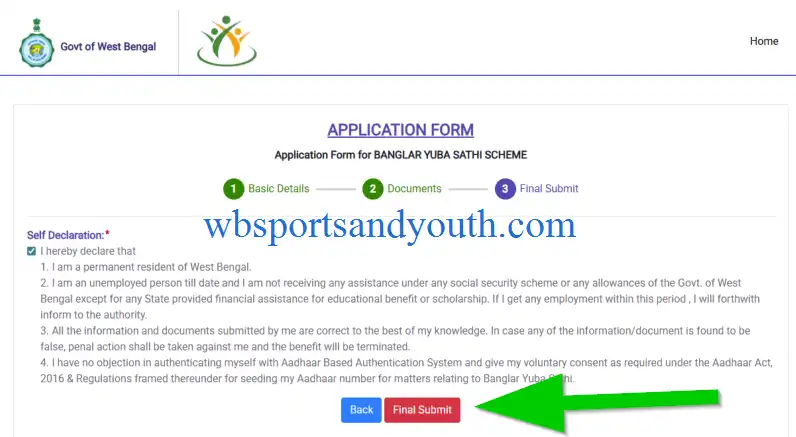
Once everything is filled and uploaded, click on "Final Submit" button.
সব ঠিক থাকলে "Final Submit" বাটনে ক্লিক করুন।
After Successful Submission:
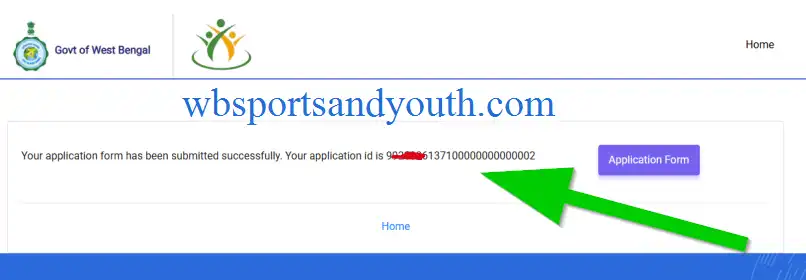
- Download your application form immediately
- Save it or take a printout for future reference
- Keep your Application ID safe - you'll need it to check status
আবেদন সফল হলে ফর্মটা ডাউনলোড করে রাখুন। পরে কাজে লাগবে!
Important Tips (গুরুত্বপূর্ণ পরামর্শ)
Use a valid mobile number - all updates will come on this number
Double-check your bank account number and IFSC code
Make sure your bank account is Aadhaar linked
Keep all documents ready before starting
Don't close the browser until you download the final form
Internet connection should be stable throughout the process
Need Help?
Have questions? Visit the official portal or contact your local Block/Municipality office for help.
প্রশ্ন থাকলে স্থানীয় ব্লক অফিস বা https://apas.wb.gov.in/ থেকে সাহায্য নিন।